
• Activity
  • Digitally Yours
  • Home New
  • Privacy Policy
  • Terms and Conditions
Social icon element need JNews Essential plugin to be activated.
  • Home
  • Latest
  • Reviews
  • How to
  • Science
  • Business
  • Security
  • More
    • All
    • AI
    • Alphabet
    • Apple
    • Apple Apps
    • Applications
    • Computing
    • Cryptocurrency
    • Cybersecurity
    • Entertainment
    • Facebook
    • Google
    • How to
    • iPhone
    • Meta
    • Metaverse
    • Microsoft
    • Movies
    • Privacy And Security
    • Smartphone
    • Social Media
    • Software
    • Special News
    • Telecommunications
    • Twitter
    • VISA
    Cryptocurrency Meaning in 2026: Definition, Benefits, and Key Insights

    Cryptocurrency Meaning in 2026: Definition, Benefits, and Key Insights

    Visa Launches $100 Million Venture Fund for Generative AI Startups

    “Tech Giants Battling for Content to Build AI”

    Meta to cut over 11,000 jobs this year

    EU Securities Watchdog to be armed with crypto data soon

    Elon Musk Makes $43 Billion Offer to Acquire Twitter

    Oscars 2022: List of Winners with CODA as Best Picture

    ‘The Batman’ OTT Release Date Confirmed

    3 ColorNote Hidden Features Probably You Didn’t Know About

    Trending Tags

    • Services
      • Hosting
      • Web Development
      • App Development
      • Shopify Development
      • SEO
    No Result
    View All Result
    • Home
    • Latest
    • Reviews
    • How to
    • Science
    • Business
    • Security
    • More
      • All
      • AI
      • Alphabet
      • Apple
      • Apple Apps
      • Applications
      • Computing
      • Cryptocurrency
      • Cybersecurity
      • Entertainment
      • Facebook
      • Google
      • How to
      • iPhone
      • Meta
      • Metaverse
      • Microsoft
      • Movies
      • Privacy And Security
      • Smartphone
      • Social Media
      • Software
      • Special News
      • Telecommunications
      • Twitter
      • VISA
      Cryptocurrency Meaning in 2026: Definition, Benefits, and Key Insights

      Cryptocurrency Meaning in 2026: Definition, Benefits, and Key Insights

      Visa Launches $100 Million Venture Fund for Generative AI Startups

      “Tech Giants Battling for Content to Build AI”

      Meta to cut over 11,000 jobs this year

      EU Securities Watchdog to be armed with crypto data soon

      Elon Musk Makes $43 Billion Offer to Acquire Twitter

      Oscars 2022: List of Winners with CODA as Best Picture

      ‘The Batman’ OTT Release Date Confirmed

      3 ColorNote Hidden Features Probably You Didn’t Know About

      Trending Tags

      • Services
        • Hosting
        • Web Development
        • App Development
        • Shopify Development
        • SEO
      Social icon element need JNews Essential plugin to be activated.
      No Result
      View All Result
      No Result
      View All Result
      Home Applications

      3 ColorNote Hidden Features Probably You Didn’t Know About

      by Rabiul I. Tushar
      March 13, 2022

      Image Source: ColorNote website

      ColorNote, the most downloaded notepad app on android platform, is a very simple and easy to use application. In any situation, you can quickly create notes and checklists. You can write all the things you need in one place — from short notes to longer documents.

      ColorNote has been adored by the users for its simple interface and some exciting features like color-coding, setting reminder, backing up notes, widgets, sharing, archiving or locking notes, managing schedule with calendar etc. Moreover, the last update has made the app smoother than before.

      If you are using the app you have already known that it provides not only device backup but also online backup. Once you have signed into the app using your email address and write something in ColorNote, there is no risk of losing the text.  ColorNote automatically syncs notes once a day, and also you can manually sync your notes. Your notes will be encrypted with the AES standard before being uploaded to the cloud storage.

      ColorNote reminds you of the saved notes so that you will never miss anything important. You can concentrate on what really matters in your life instead of worrying about remembering stuff.

      In addition to these, ColorNote has some awesome hidden features most users usually don’t know about. These features are really amazing and I think you will love them. So let’s talk about them.


      Keep Reading:

      • Five Windows 10 Default Settings You Should Disable Now
      • Metaverse Meaning and How It Works in 2022

      Changing note type from text to checklist

      You may have written a grocery list in a text note accidentally. No worries, ColorNote will allow you to convert your text note into a checklist. First, you have to put square brackets before each item. It is important that you enter one space inside the square brackets and also one space just before the item.

      After adding the brackets in this way, save the text note, and then send this text note to the ColorNote app. When you finish sending it, a new checklist will be created containing your list! You can delete the previous text note or keep it if you want.

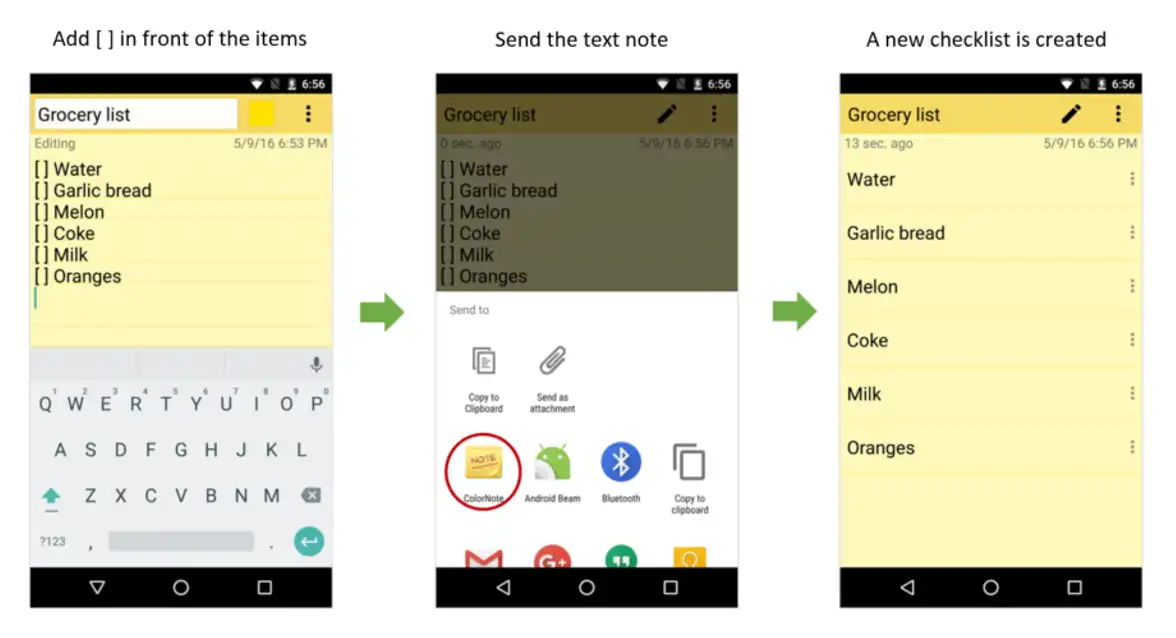
      The steps of changing note type from text to checklist (Image Source: ColorNote Website)

      Using Auto Link to create a sub-note

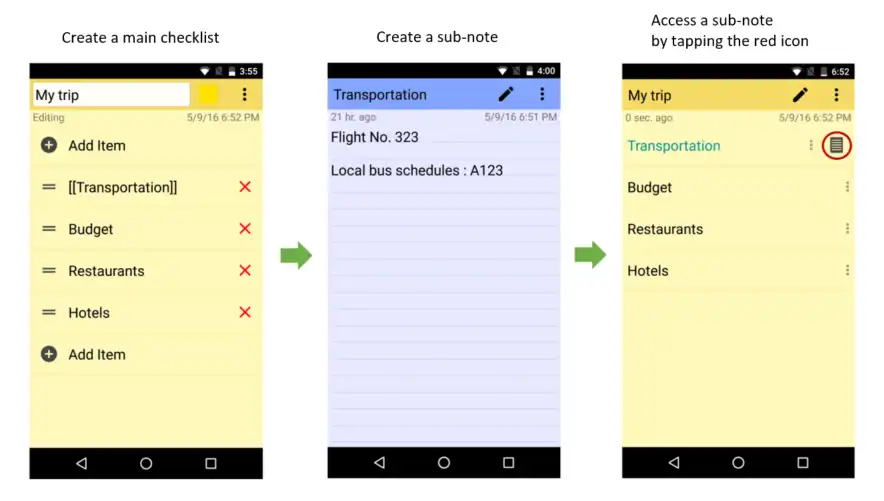
      When you plan a trip, you often prepare a list to ensure a successful trip. Normally, you draw up a list of sub-topics, continue to branch out to many sub-sub-topics. Too much information can be a headache without the right tools. Auto Link is a great feature in ColorNote which helps you move directly from the main note to sub-note.

      For example, you add a new checklist titled ‘My Trip’. You quickly type in the checklist such as Transportation, Budget, Restaurants, Hotels etc. To remember the details regarding transportation, you create a sub-note and write the flight and local bus schedules. The note’s title should be ‘Transportation’. Then you go back to the main checklist, edit the words enclosing them in double square brackets like: [[Transportation]].

      Finally, each item of the checklist can access the linked sub-notes directly!

      The steps of creating a sub-note from a text note or checklist (Image Source: ColorNote Website)

      Auto link wiki word

      Apart from creating sub-note by using square brackets before and after any word, phrase or sentence, you can do the same using ‘auto link wiki word’ feature.

      This feature remains turned off in the app setting by default, but you can turn on it by simply going to Settings > Auto link > Auto link wiki word. Now, checkmark the ‘Auto link wiki word’ feature by tapping on the yellow circled area as showed in the following image.

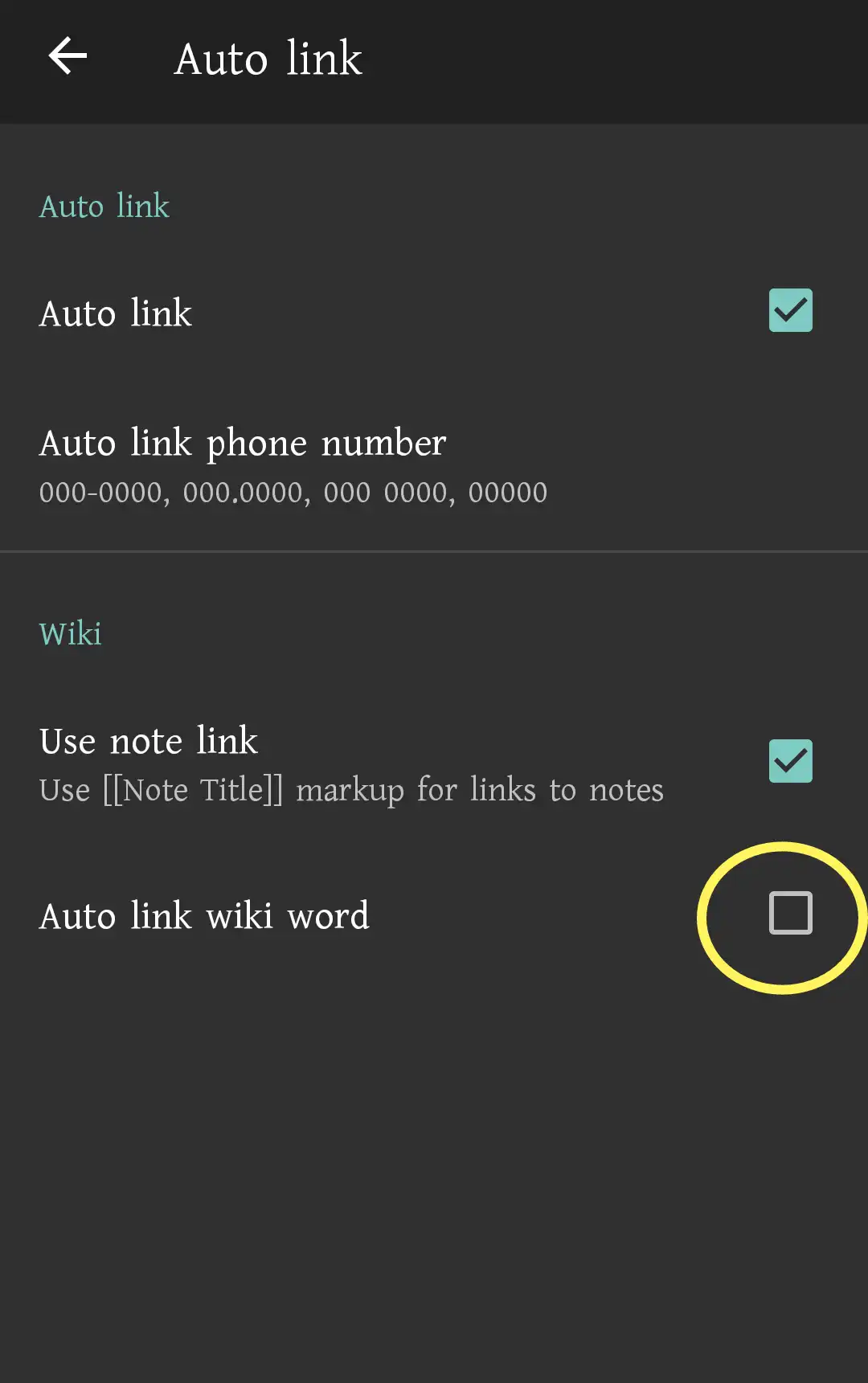
      Screenshot by Techogram

      For its huge popularity among the users, ColorNote was included in Google Play’s Best Apps list of 2015. However, the only thing this app is missing is ‘word count feature’ which is very much demanded in this type of apps these days. We hope the ColorNote developer team will consider the issue in order to make the app an complete one.

      It is noted that majority of the information and images we provide come from the ColorNote website.
      Tags: Android noteApp featuresColor NoteColorNoteHidden featuresNoteNotepadNotepad app

      Rabiul I. Tushar

      Rabiul I. Tushar is a technology enthusiast and journalist. Though his undergraduate major was law, he is now mostly engaged in technology journalism. He is researching and tinkering with a wide range of topics, including tech start-up, business, communication, AI and security.

      Categories

      • AI
      • Apple
      • Apple Apps
      • Applications
      • Computing
      • Cryptocurrency
      • Cybersecurity
      • Entertainment
      • Facebook
      • Google
      • How to
      • iPhone
      • Meta
      • Metaverse
      • Microsoft
      • Movies
      • Smartphone
      • Social Media
      • Software
      • Special News
      • Telecommunications
      • Twitter
      • VISA

      Tags

      AI ai startup Android note App features Apple Batman bitcoin ColorNote Color Note content crypto cryptocurrency cryptocurrency meaning DCEU digital currency Elon Musk Ericsson facebook HBO Max Hidden features Iraq job cut Mark Zuckerberg meta Microsoft Note Notepad Notepad app Oscars 2022 OTT Release Robert Pattinson russia social media Sony startup Streaming tech tech giants Telecom Telecommunications The Batman Twitter ukraine US Court Visa

      © 2022 Techogram all rights reserved

      No Result
      View All Result
      • Home
      • Reviews
      • Apple
      • Applications
      • Computer
      • Gaming
      • Gear
        • Audio
        • Camera
        • Smartphone
      • Microsoft
      • Photography
      • Security
      • Service
        • Hosting
        • Web Development
        • App Development
        • Shopify Development
        • SEO

      © 2022 Techogram all rights reserved

      This website uses cookies. By continuing to use this website you are giving consent to cookies being used. Visit our Privacy and Cookie Policy.
      Exit mobile version